
Updated on 2026-01-20 / iPhone Tips
iPads are powerful devices, but they can face issues like frozen screens, recovery mode loops, Apple logo stuck, or failed updates. If you’re looking for an easy, safe, and reliable way to fix these problems, ReiBoot for iPad is the solution.
This article will guide you through downloading ReiBoot for iPad for free and using it to repair your iPad. It will also explain its key features and show how to fix common iPadOS issues all without losing your data. By the end, you’ll know exactly how to restore your iPad to smooth working condition quickly and safely.
Part 1: What Is Tenorshare ReiBoot for iPad?
Tenorshare ReiBoot for iPad is a professional iPadOS system repair tool designed to fix common and complex iPad issues without technical skills. It helps resolve problems like iPad stuck on the Apple logo, recovery mode loop, frozen screen, and update failures.
ReiBoot supports all iPad models and works with iPadOS from iOS 7 up to the latest versions. With one-click repair options, it offers a safer and easier alternative to manual fixes.
1.1 Why Choose ReiBoot for iPad Instead of iTunes?
- One-click repair: Fix iPad system issues without complex steps
- No data loss (Standard Repair): iTunes often wipes data during restore
- Fix more errors: Handles boot loops, Apple logo stuck, and black screen issues
- Beginner-friendly: No technical knowledge required
- No iTunes error codes: Avoid common restore and update failures
- Supports latest iPadOS: Updated regularly for new iPad versions
Part 2: ReiBoot for iPad Free – What You Get Without Paying
Many users search for ReiBoot for iPad free because they want to fix basic iPad problems without risking money or data. The good news is that Tenorshare ReiBoot offers a free download that includes several useful features for iPad users.
With the ReiBoot free download, you can enter iPad Recovery Mode with one click. This is especially helpful if your iPad is stuck in recovery mode, keeps showing the connect-to-computer screen, or fails to restart normally. Unlike iTunes, ReiBoot does not require complicated button combinations or technical knowledge.
The free version also allows ReiBoot to detect iPadOS system issues before repair. This helps users understand what is wrong with their device without making any changes.
While advanced repair features require the paid version, the free ReiBoot for iPad is still very useful for common problems and is often enough to bring an iPad back to normal.
Part 3: ReiBoot iOS System Repair – Key Features for iPad Users
Tenorshare ReiBoot is more than just a recovery-mode tool. It is a complete ReiBoot iOS system repair solution built specifically to handle iPadOS problems safely and efficiently. After downloading ReiBoot for free, users can unlock powerful repair options when needed.
One-Click Enter & Exit Recovery Mode
ReiBoot allows iPad users to enter or exit recovery mode instantly. This feature alone solves many issues where the iPad is stuck on the recovery screen or won’t boot properly.
Standard Repair – No Data Loss
The Standard Repair mode fixes common iPad issues such as Apple logo stuck, frozen screen, boot loop, and unresponsive touch without deleting data. This is the most recommended option for everyday iPad problems.
Fix 150+ iPadOS System Issues
ReiBoot iOS system repair can resolve over 150 system-level issues, including black screen, iPad stuck updating, iPad won’t turn on, and repeated restarts. No jailbreak is required.
Update or Downgrade iPadOS
ReiBoot lets you update or downgrade iPadOS without using iTunes. It downloads the correct firmware automatically and avoids common update or restore errors. No jailbreak is needed.
Backup & Restore iPad Data
Before fixing system issues, ReiBoot allows you to back up your iPad data. After the repair, you can restore everything easily, keeping your files safe.
Download & Repair iPadOS Safely
ReiBoot automatically downloads the correct firmware for your iPad model. This reduces errors and ensures a smooth repair process, even for users with no technical background.
Works on All iPad Models & Latest iPadOS
The tool supports all iPad versions and is regularly updated to work with the latest iPadOS releases. This makes ReiBoot iOS system repair free download a reliable option for both old and new devices.
Part 4: How to Download ReiBoot for iPad (Free & Safe)
The ReiBoot free download is available for both Windows and macOS and works with all iPad models. The software is regularly updated, virus-free, and designed to repair iPadOS issues without jailbreaking or data risks.
To get started, download Tenorshare ReiBoot iOS system repair free download from the official Tenorshare website. Install it on your computer and follow the on-screen instructions. Once installed, you can connect your iPad and start diagnosing system problems safely.
4.1 How to Use ReiBoot on iPad (Step-by-Step Guide)
Step 1: Install ReiBoot on Your Computer
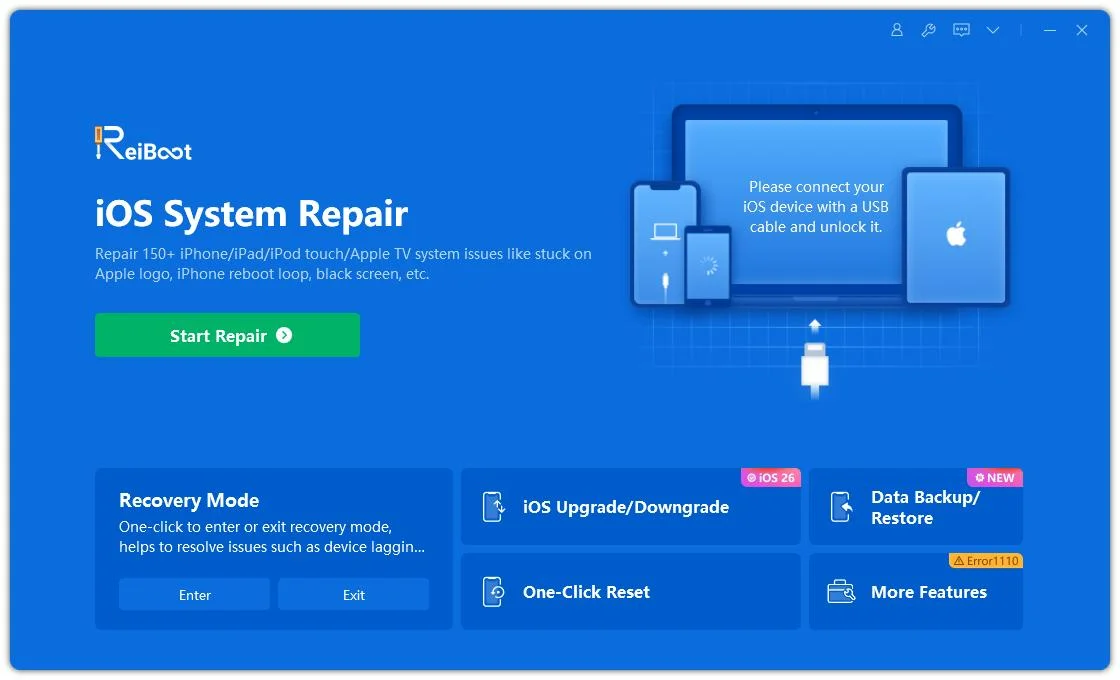
Open ReiBoot and click the “Start” button on the main screen.
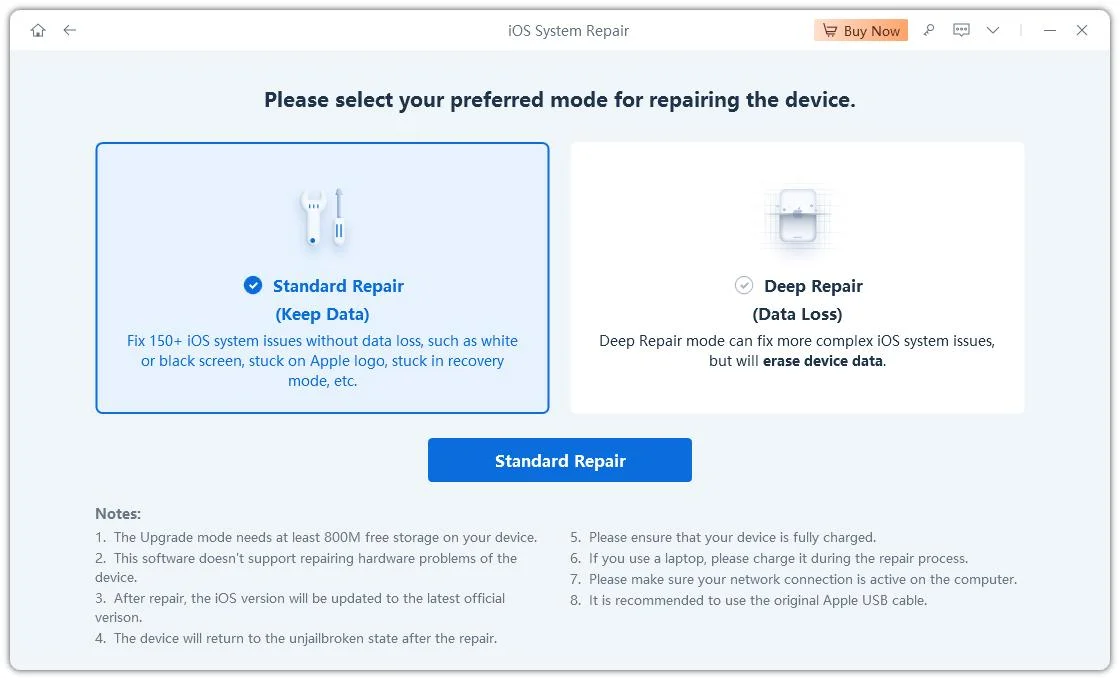
Step 2: Choose “Standard Repair”
Select Standard Repair to fix common iPadOS issues while keeping your data safe. This mode is recommended for problems like Apple logo stuck, frozen screen, or boot loop.
Step 3: Download the Firmware
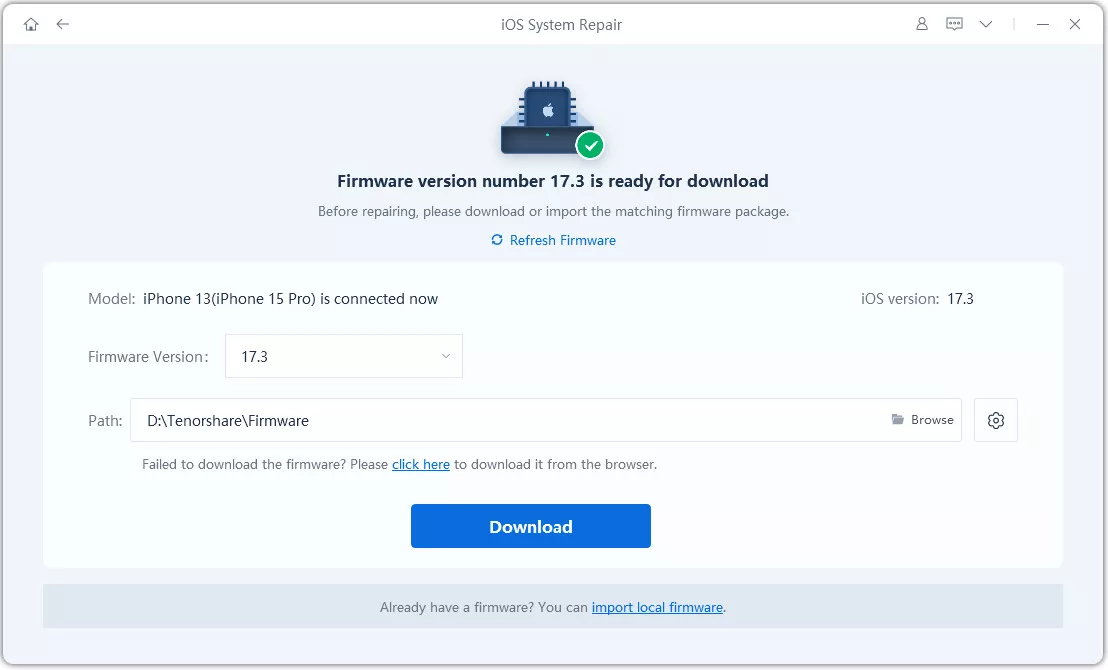
Click Download to get the correct firmware package for your iPad model. If required, ReiBoot will guide you to put your iPad into Recovery Mode or DFU Mode automatically.
Step 4: Begin the Repair
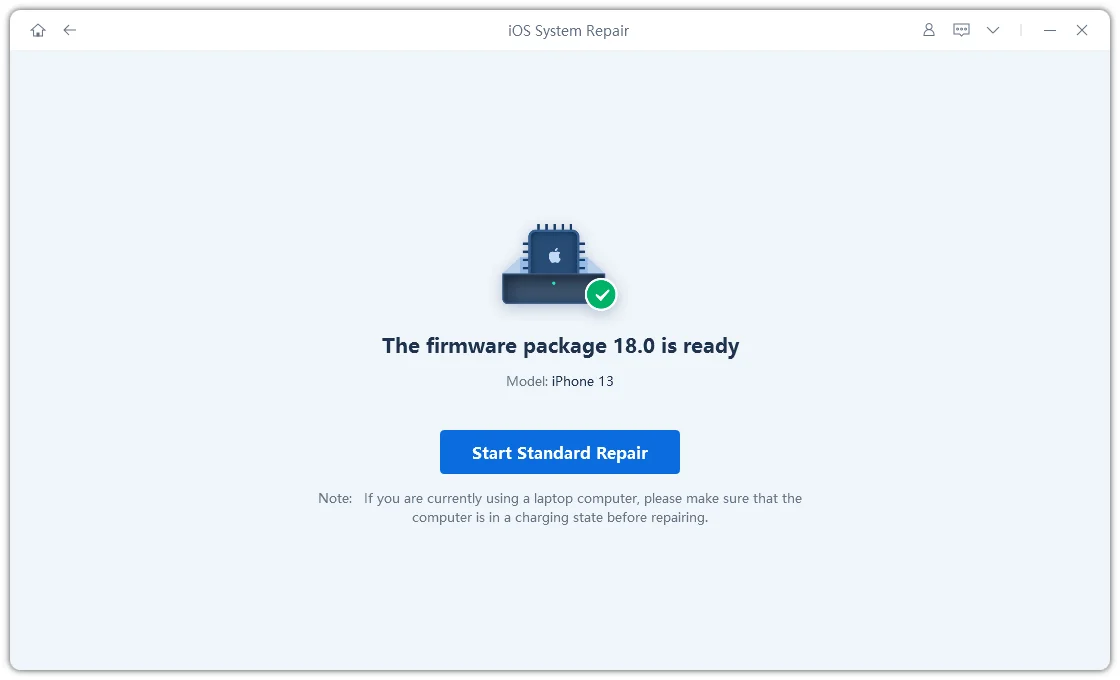
After the firmware is downloaded, click Start Standard Repair. ReiBoot will begin repairing the iPadOS system. Do not disconnect your iPad during this process.
Step 5: Standard Repair Completed
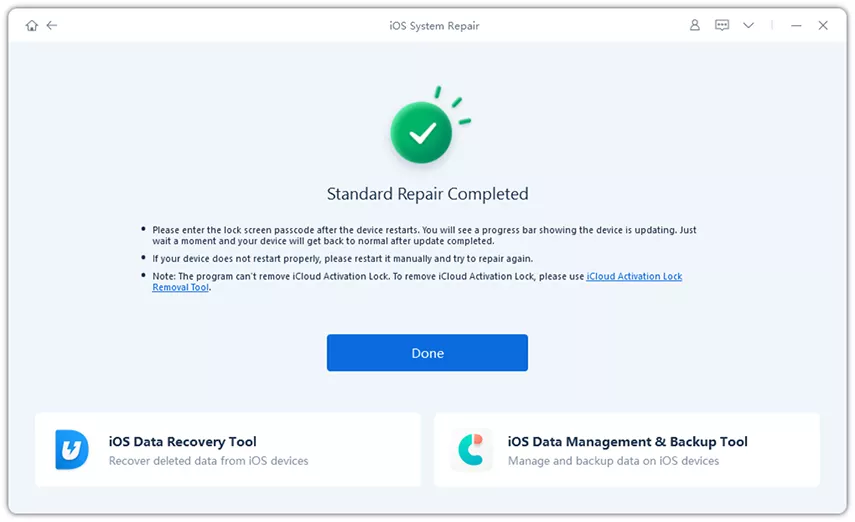
Once the repair is finished, your iPad will restart automatically. The system issues will be fixed, and all your data will remain intact.
4.2 Common iPad Issues ReiBoot Can Fix
iPadOS problems often appear after software updates, failed restores, or sudden system crashes. In many cases, basic fixes or iTunes do not work and may even cause data loss. Tenorshare ReiBoot is designed to repair these system-level issues safely, without complex steps.
Below are the most common iPad problems that ReiBoot iOS system repair can fix:
iPad stuck on the Apple logo
Repairs startup issues where the iPad freezes on the Apple logo and cannot load the home screen.
iPad stuck in Recovery Mode
Exits recovery mode with one click, without restoring the device or deleting data.
iPad stuck in a boot loop
Fixes repeated restarting caused by corrupted iPadOS files or failed updates.
iPad screen frozen or not responding
Repairs system crashes that cause the screen or touch to stop working.
iPad won’t turn on but is detected by computer
Fixes black screen issues related to software errors, not hardware damage.
iPad stuck updating or verifying update
Resolves update freezes and installation failures without using iTunes.
iPad black screen or white screen
Repairs display issues caused by iPadOS system faults.
iPad keeps restarting randomly
Fixes unstable system behavior triggered by incomplete installations or crashes.
iPad touch not working properly
Solves touch response problems caused by iPadOS glitches.
iPad stuck on loading bar or progress screen
Repairs cases where the loading bar stops moving during startup or restore.
iTunes errors during restore or update
Fixes common iTunes error codes that prevent iPad restoration or firmware installation.
iPad stuck in DFU mode
Safely exits DFU mode and restores normal system operation.
FAQs About ReiBoot for iPad
Does ReiBoot work on iPad?
Yes. Tenorshare ReiBoot works on all iPad models, including iPad Pro, iPad Air, iPad Mini, and standard iPad. It supports iPadOS from older versions up to the latest releases and can fix common system issues like recovery mode, Apple logo stuck, and frozen screen.
Is it safe to use ReiBoot?
Yes, ReiBoot is safe to use. The Standard Repair mode fixes iPadOS problems without deleting data and does not require jailbreak. It only repairs system files and does not access personal content.
Can I repair my iPad myself?
Yes. ReiBoot is designed for non-technical users. With clear on-screen instructions and one-click repair options, you can fix many iPadOS issues at home without visiting a service center or using complex tools.
Conclusion:
Tenorshare ReiBoot for iPad is the best solution for repairing iPadOS issues safely, quickly, and without data loss. From frozen screens to update failures, recovery mode, and boot loops, ReiBoot provides one-click fixes for all common iPad problems. With a free download available for Windows and Mac, anyone can repair their iPad at home. For iPad users looking for a simple, effective, and trusted repair solution, ReiBoot for iPad is the top choice.
