Updated on 2026-09-17 / iPhone Tips
iOS 27 is here, bringing a mix of new features, bug fixes, and performance improvements. Released recently, it supports most modern iPhones, ensuring smoother performance and enhanced security. But the key question remains: is iOS 27 worth it? Should you update now or stick with your current version?
In this article, we'll cover all the new features, improvements, and possible drawbacks of iOS 27. This will help you decide if upgrading to iOS 27 is the right choice for your device.
- Part 1: What's New in iOS 27?
- Part 2: iOS 27 Performance and Battery Life
- Part 3: Pros of Updating to iOS 27
- Part 4: iOS 27 Cons and Potential Issues
- Part 5: iOS 27 vs Previous Versions
- Conclusion: Should You Update to iOS 27?
- Bonus Tip: Fix iOS 27 Issues on iPhone with One-Click
Part 1: What's New in iOS 27?
iOS 27 brings a mix of exciting features, improvements, and tweaks for iPhone users. Apple has rolled out the fourth developer and public betas, with the official release expected soon. This update is not just cosmetic it introduces new tools in Apple Music, Messages, Apple Podcasts, Health, and accessibility settings.
Key highlights of iOS 27 include:
-
New Emoji: Eight new emoji like Distorted Face, Bigfoot, trombone, treasure chest, orca, fight cloud, and landslide to express your emotions more vividly.
-
Apple Music Updates: A redesigned Profile, full-screen album artwork, the ability to add a song to multiple playlists, and the new Playlist Playground that generates playlists using Apple Intelligence from text prompts.
-
New Widgets: Ambient Music widgets for moods like Chill, Productivity, Sleep, and Wellbeing, available in small and medium sizes.
-
RCS Messaging (Beta): End-to-end encryption support for RCS messages, showing a lock icon in chats. This feature is still in beta testing.
-
Apple Podcasts: Advanced video podcast features, dynamic video ads, and smoother switching between video and audio.
-
Health & Vitals: Sleep tracking with average bedtime metrics and restored Blood Oxygen readings in the Vitals app.
-
Stolen Device Protection: Enabled by default, requiring Face ID for certain sensitive actions and adding a time delay for extra security.
-
Other Changes: Redesigned Wallpaper Gallery, Control Center improvements in Dark Mode, Freeform Creator Studio live for subscribers, and a new iCloud search setting for Photos and iCloud Drive.
Part 2. iOS 27 Performance and Battery Life
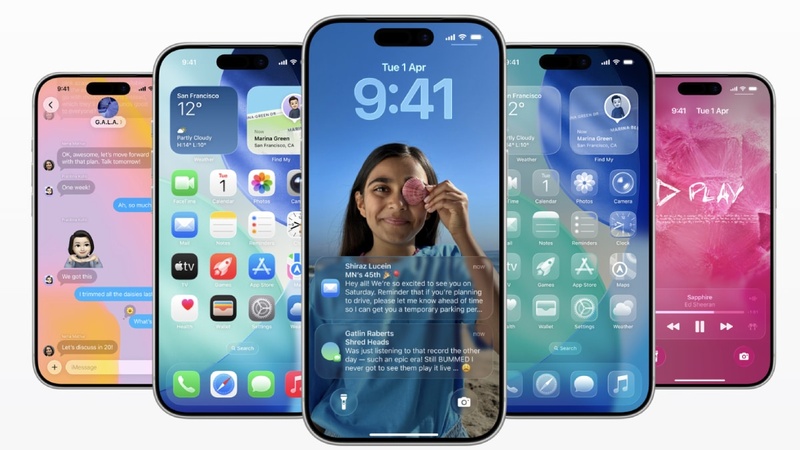
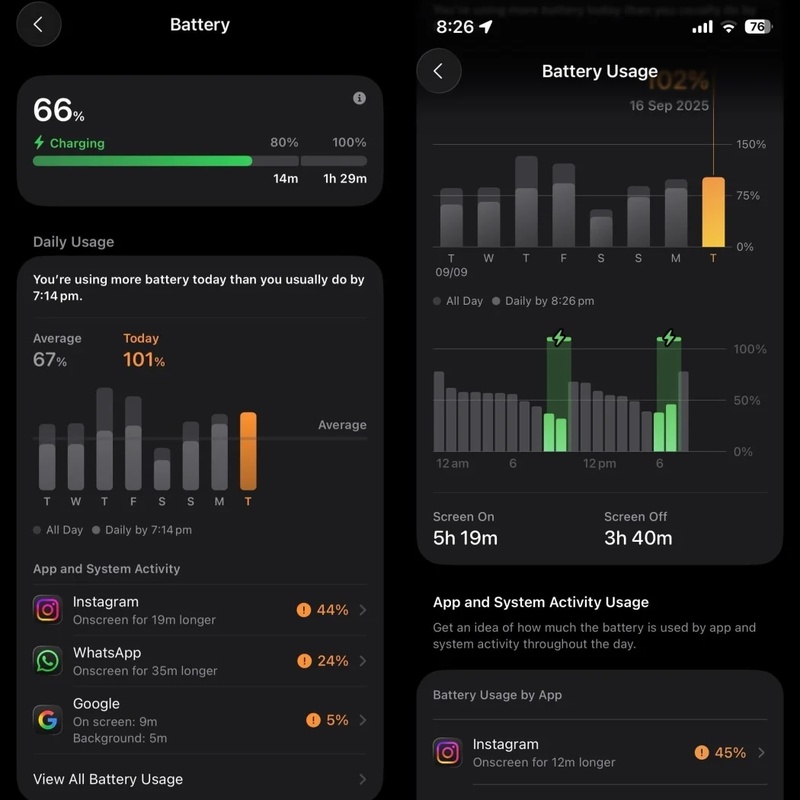
iOS 27 brings smoother performance and improved battery management on most compatible iPhones. Apple optimized background processes, so apps launch faster and battery drain is reduced during heavy use. Is it worth to upgrade to ios 27?
Users testing the beta report more consistent performance, though minor glitches like keyboard lag or Safari search issues still appear.
Part 3. Pros of Updating to iOS 27
-
New Emojis: Adds eight fun options, including Distorted Face, Fight Cloud, Orca, Trombone, Landslide, Treasure Chest, Hairy Creature, and Ballet Dancer.
-
Apple Music Enhancements: Playlist Playground uses AI to generate playlists based on mood or prompts. Full-screen artwork and "Concerts Near You" improve music discovery.
-
Accessibility Improvements: "Reduce Bright Effects" minimizes flashing and highlights for sensitive users.
-
Apple Podcasts: Enhanced video podcast experience with dynamic ads and smoother switching between audio/video.
-
Health Updates: Restores Blood Oxygen metrics in Vitals and adds average bedtime tracking.
-
Stolen Device Protection: Now enabled by default, requiring Face ID for sensitive actions outside trusted locations.
Part 4. iOS 27 Cons and Potential Issues
-
Keyboard Glitches: Swipe-to-type and autocorrect can still misbehave, sometimes adding extra words or skipping keystrokes.
-
Safari & Search Bugs: Some users report blacked-out screens or repeated searches.
-
RCS Encryption Delays: End-to-end RCS encryption was removed from the latest beta; full support is expected in a future release.
-
Beta Limitations: iOS 27 is still in beta, meaning features may change or be removed before the official release.
Part 5. iOS 27 vs Previous Versions
Compared to iOS 26.3, iOS 26.5 is a more feature-rich update. It improves multimedia experiences, AI-driven playlists, accessibility settings, and health tracking. While 26.3 mainly offered minor tweaks, 27 introduces significant additions for Apple Music, Podcasts, and security. Should I update to iOS 27? Battery life and system performance are better optimized, but some lingering bugs from earlier versions still persist. Overall, 27 provides a more modern, AI-integrated iPhone experience.
Conclusion: Should You Update to iOS 27?
iOS 27 brings exciting new features like eight new emojis, AI-powered Playlist Playground in Apple Music, enhanced Podcasts, improved health metrics, and accessibility options like Reduce Bright Effects. While some beta bugs exist, overall performance is solid, and the update adds meaningful functionality. So if you're wondering is iOS 27 worth it, it definitely is for users who want a mix of fun, productivity, and smoother usability.
Bonus Tip: Fix iOS 27 Issues on iPhone with One-Click
Experiencing glitches, freezes, or battery issues after updating to iOS 27 can be frustrating. Tenorshare ReiBoot is the ultimate solution for iPhone and iPad users, offering a safe, fast, and reliable way to repair your device without losing your data.
Trusted by millions worldwide and with over 14 years of experience, ReiBoot supports iOS/iPadOS 26 and resolves over 150 system issues, from stuck Apple logos to recovery mode problems. Its AI-powered technology ensures quick diagnostics and safe repairs.
Key Features of Tenorshare ReiBoot:
-
Free Recovery Mode: Enter or exit iPhone recovery mode with one click.
-
Standard Repair: Fix common iOS issues without affecting data.
-
Deep Repair & DFU Mode: Resolve severe system problems safely.
-
iOS Upgrade/Downgrade: Update or revert iOS versions easily, no jailbreak needed.
-
Backup & Restore: Securely back up and restore iPhone data without iTunes or iCloud.
-
Permanent Data Erase: Fully erase personal data before selling or trading.
Step-by-Step: How to Fix iOS 27 Issues Using Tenorshare ReiBoot
-
Step 1: Download and Launch ReiBoot
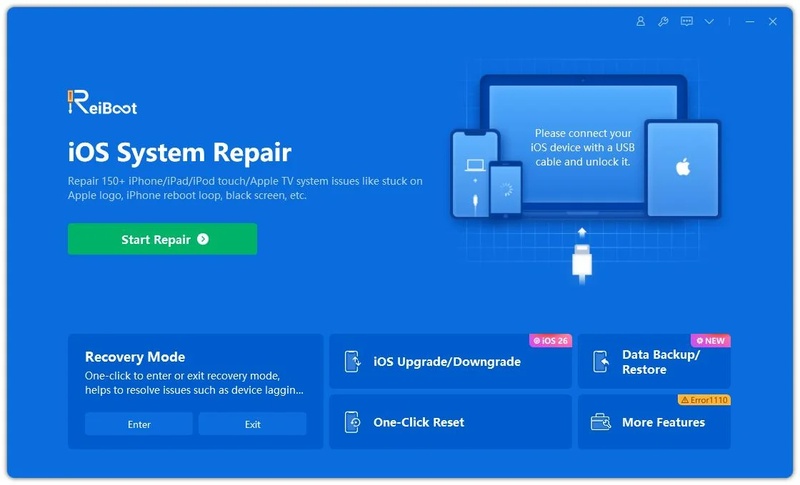
Install Tenorshare ReiBoot on your computer and connect your iPhone using a USB cable. Open ReiBoot and click Start Repair to initiate the recovery process.
-
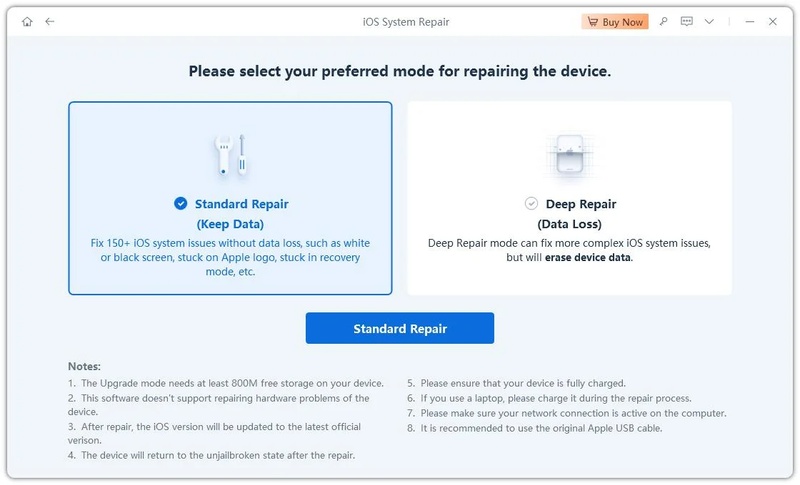
Step 2: Select Standard Repair
Choose Standard Repair to fix common iOS problems like Apple logo, black screen, or app crashes without losing your data.
-
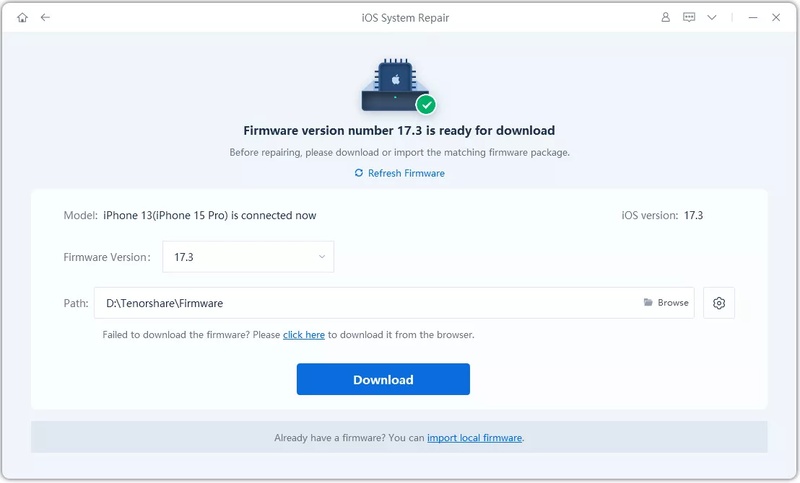
Step 3: Download Firmware
ReiBoot will detect your device model and iOS version. Click Download to get the required firmware package for your iPhone.
-
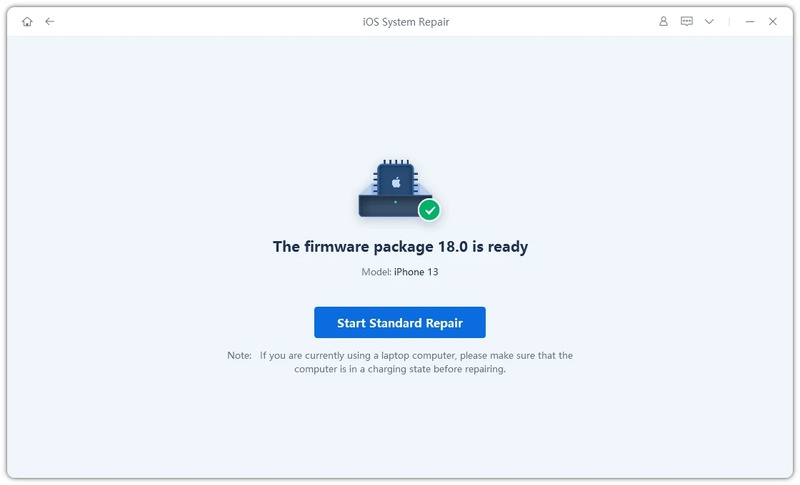
Step 4: Start Repair
Once the firmware is downloaded, click Start Standard Repair. The tool will automatically diagnose and repair your device.
-
Step 5: Complete and Restart
Wait for the process to finish. Your iPhone will restart automatically, fully functional and free from iOS 27 glitches.