
Updated on 2026-09-15 / iPhone Tips
Upgrading to the latest iPhone features is easy with how to get iOS 26.5. This guide shows you step by step how to download and install the beta or official update safely. If you want to update beyond iOS 26.5, we'll also cover how to get iOS 27 on your compatible iPhone.Every step is clear and simple, so you can upgrade without any hassle.
Enjoy the new features, improvements, and bug fixes Apple has included in iOS 26.5. For the latest iOS experience, you can also update to iOS 27 if your iPhone supports it. Follow this guide and get your iPhone ready for the latest iOS experience today.
- Part 1: Part 1: What's New in iOS 26.5?
- Part 2: Part 2: Is Your iPhone Compatible with iOS 26.5?
- Part 3: Part 3: How to Prepare Your iPhone for iOS 26.5
- Part 4: Part 4: How to Install iOS 26.5 Official Update
- Part 5: Bonus Tip: One-Click iOS Upgrade & Downgrade Made Easy with Tenorshare ReiBoot
- Part 6: FAQs About iOS 26.5
- Part 7: Final Words
Part 1: What's New in iOS 26.5?
Before understanding how to get iOS 26.5, it's important to see what this update offers. iOS 26.5 is out now in beta (RC), and it brings useful improvements, smarter features, and better security.
Here are the key highlights:
- Encrypted RCS Messaging (Early Testing)
Apple is testing end-to-end encrypted RCS messaging. A new toggle in Messages allows secure chats with a lock icon. This is a big step toward safer communication.
- AI-Generated Apple Music Playlists
A new Playlist Playground lets you create playlists using simple text prompts. Just type your mood, and your playlist is ready.
- Stolen Device Protection Updates
This feature is now enabled by default. It adds extra security using Face ID or Touch ID for sensitive actions.
- Video Support in Apple Podcasts
You can now watch video podcasts, switch between audio and video, and download them for offline use.
- Visual and Performance Improvements
Apple added a setting to reduce bright visual effects and improved overall performance with bug fixes.
Part 2: Is Your iPhone Compatible with iOS 26.5?
Before following how to get iOS 26.5 beta or installing the official update, you must check if your device supports it.
Supported iPhones:
-
iPhone 11
-
iPhone 11 Pro / Pro Max
-
iPhone 12 series
-
iPhone 13 series
-
iPhone 14 series
-
iPhone 15 series
-
iPhone 16 series
-
iPhone 17 series
-
Newer models (including upcoming releases)
If your device is older than iPhone 11, you won't be able to install this update.
Some features, like AI tools, only work on:
-
iPhone 15 Pro / Pro Max
-
iPhone 16 and newer
Part 3: How to Prepare Your iPhone for iOS 26.5
Before you follow how to get iOS 26.5, preparing your iPhone is very important. This helps avoid errors, data loss, or failed installation.
-
Start by checking compatibility. iOS 26.5 works on iPhone 11 and newer models. Older devices will not support this update.
-
Update your device to the latest stable version (iOS 26.3). This ensures a smooth upgrade process.
-
Make sure you have a strong Wi-Fi connection and at least 9GB of free storage. Updates can fail on weak internet or low space.
-
Backup your iPhone using iCloud or a computer. A local encrypted backup is recommended for safety.
Finally, keep your battery above 50% or plug in your device. Once everything is ready, you can safely move to how to download and install iOS 26.5.
Part 4: How to Install iOS 26.5 Official Update
The official version is stable and best for daily use. Follow these steps for how to install iOS 26.5 official update safely.If you want to install the latest major release instead, go to Settings > General > Software Update and check for iOS 27.
Step-by-Step: Install iOS 26.5 Official Update
-
Step 1: Connect to Wi-Fi
Make sure your iPhone is connected to a strong and stable Wi-Fi network. Updates are large and may fail on weak connections.
-
Step 2: Charge Your iPhone
Keep your battery above 50% or plug your device into a charger. This prevents shutdown during installation.
-
Step 3: Open Settings
Go to the Settings app on your iPhone.
-
Step 4: Go to Software Update
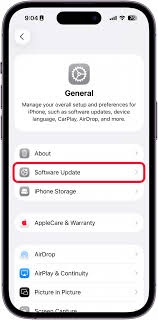
Tap General > Software Update. Your phone will check for updates.
-
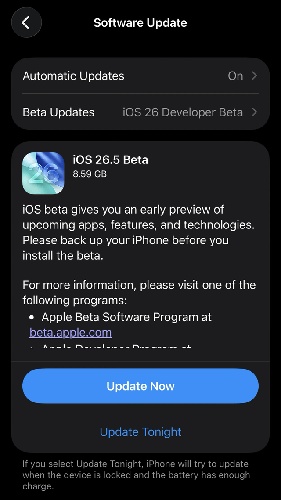
Step 5: Find iOS 26.5 Update
Once available, you will see iOS 26.5 listed on the screen.
-
Step 6: Tap Download and Install
Tap Update to begin the process.
-
Step 7: Enter Passcode
Enter your iPhone passcode to continue.
-
Step 8: Accept Terms and Conditions
Tap Agree to start downloading the update.
-
Step 9: Wait for Installation
The update will download and install automatically. Your iPhone will restart during the process.
-
Step 10: Complete Setup
After restart, follow any on-screen instructions. Your iPhone is now updated.
Bonus Tip: One-Click iOS Upgrade & Downgrade Made Easy with Tenorshare ReiBoot
Updating your iPhone should be simple, but sometimes things go wrong. Errors, stuck screens, or failed updates can make the process frustrating. While following how to get iOS 26.5, many users face issues during upgrade or downgrade. That's where Tenorshare ReiBoot makes everything easier.
This powerful tool helps you upgrade, downgrade, and fix iOS problems in just a few clicks. No technical skills are needed. Whether you want to install iOS 26.5 or go back to a stable version, ReiBoot offers a smooth and safe solution.
Key Features of Tenorshare ReiBoot:
-
One-click iOS upgrade and downgrade
-
Fix iPhone stuck on Apple logo, recovery mode, or black screen
-
No data loss in standard repair mode
-
Supports latest iOS versions including iOS 26.5
-
Simple and beginner-friendly interface
-
Fast firmware download and installation
-
Works on both Windows and Mac
Video Guide: How to Upgrade to iOS 26.5 with Tenorshare ReiBoot
FAQs About iOS 26.5
1. Can I install iOS 26.5 on older iPhones?
No, older iPhones are not supported. iOS 26.5 only works on iPhone 11 and newer models . If your device is older, you won't be able to follow how to get iOS 26.5 or install the update.
2. Do I need a paid Apple Developer account?
No, you don't need to pay. Apple now allows users to install beta updates with a free developer account . This means anyone can try how to get iOS 26.5 beta without spending money.
3. What are the major new features in iOS 26.5?
iOS 26.5 brings several useful updates and improvements, including:
-
End-to-end encrypted RCS messaging (testing phase)
-
AI-generated playlists in Apple Music
-
Video support in Apple Podcasts
-
Improved security with Stolen Device Protection
-
Performance improvements and bug fixes
Final Words
Getting the latest update is now simple once you understand how to get iOS 26.5. Whether you choose the beta for early access or wait for the official release, the steps are easy to follow. If you face errors, stuck updates, or want to downgrade later, using Tenorshare ReiBoot is a smart choice. It helps you upgrade or downgrade iOS quickly, safely, and without data loss making the whole process stress-free.
