
Updated on 2026-07-21 / iPhone Tips
Since the iOS 27 release, many users have been complaining about iOS 27 getting stuck on the "Install Now" screen on their iPhones. It can happen during the update or even while transferring data to a new iPhone.
But it's usually due to a software problem, not a hardware one, and it can often be fixed without losing your photos or data. In this guide, you'll find 8 fixes to resolve the "iOS 27 stuck on Install Now" issue, and reasons why it happens, especially during data transfer.
Part 1. Quick Fixes for iOS 27 Stuck on Install Now
Here's a glance at the 8 solutions for fixing iOS 27 stuck on the Install Now screen, explained in the latter section:
| Method | Success Rate | Data Loss Risk | Ease of Use | Time Required |
|---|---|---|---|---|
| Check Wi-Fi Stability | Moderate | None | Very easy | 5 min |
| Fix with ReiBoot | Very high | None | Very easy | 6 min |
| Force Restart iPhone | Moderate | None | Easy | 2-3 min |
| Ensure Enough Battery | Low-moderate | None | Very easy | 1 min + charge time |
| Free Up Storage Space | Moderate | None | Easy | 10-15 min |
| Delete Update & Re Download | High | None | Easy | 10-20 min |
| Reset Network Settings | Moderate | Only settings | Easy | 3-5 min |
| Update via Finder or iTunes | High | Yes, without a backup | Moderate | 20-40 min |
Part 2. How to Fix iOS 27 Stuck on Install Now (8 Proven Solutions)
Here are 8 solutions to fix iOS 27 stuck on the Install Now screen on your iPhone. Pick based on your situation:
1. Check Wi-Fi Stability
The simplest place to start is to check your WiFi stability. The iOS 27 OTA (over-the-air) update package is large, typically between 1.5 GB and 4 GB, depending on your current iOS version. If your Wi-Fi connection is dropping packets or fluctuating in speed, the download can stall and leave your iPhone software update stuck on "Install Now." So, here's how to check WiFi stability:
-
Step 1: Connect to a 5 GHz Wi-Fi network instead of 2.4 GHz if possible. Also, move closer to your router to improve signal strength.
-
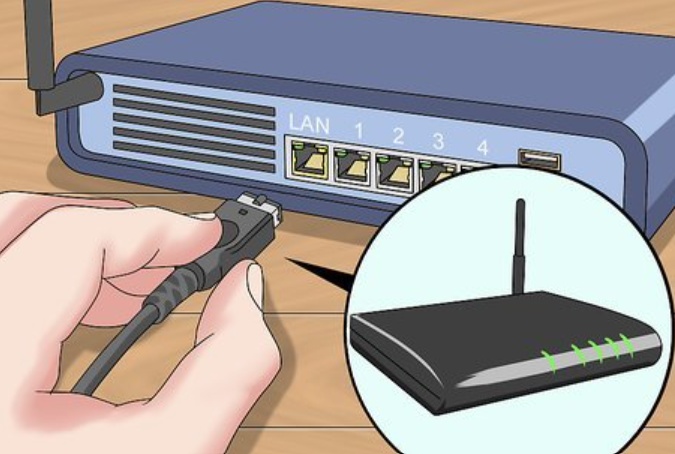
Step 2: Restart your router by unplugging it for 30 seconds, then plug it back in. If using a shared or office network, switch to home Wi-Fi or a personal hotspot.
-
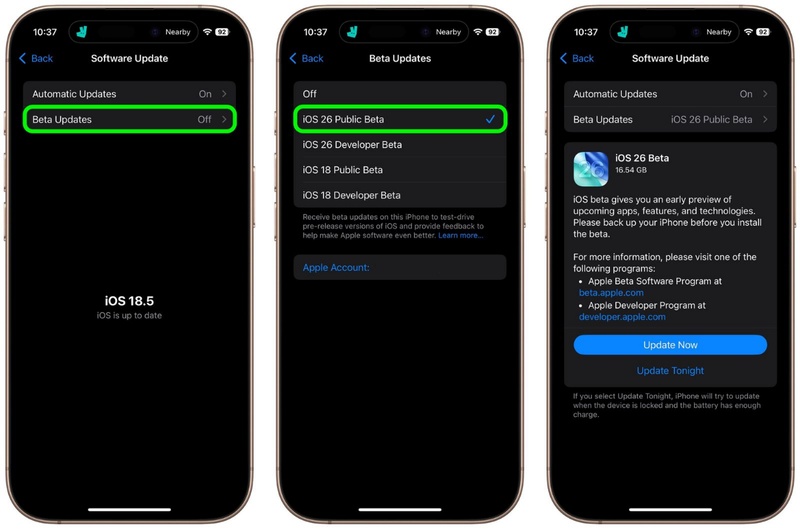
Step 3: Head back to "Settings," then "General." Tap "Software Update." Next, click "Updates." Choose the update for iOS 27 and wait to fetch details.
-
Step 4: Go back and choose "Update Now" to re-download a fresh copy of the iOS 27.
Note: Apple's update servers can also get congested right after a new drops. If you're installing on the same day as the release, try again a few hours later.
2. Fix iOS 27 Stuck on Install Now Simply with Reiboot
When basic fixes don't resolve the "iOS 27 stuck on Install Now" problem, the issue is often caused by a damaged iOS system or a failed update. Tenorshare ReiBoot is designed to fix these issues by repairing the iPhone system without deleting your photos, messages, or other personal data. Unlike restoring through iTunes or doing a factory reset, it offers a safer way to fix an iPhone stuck during an iOS update.
Main Features of ReiBoot:
-
Fixes 150+ iOS system issues, including update loops, frozen install screens, iPhone stuck on Apple logo, blue/black screen, etc.
-
Resolves iOS 27 update stuck on "Update Requested," after data transfer, and post-update boot loops
-
Compatible with earlier iPhones, up to 17, and all iOS versions, including iOS 27 builds.
-
Back up and restore iPhone easily without iTunes or iCloud.
-
Safely upgrade or downgrade iOS without jailbreak or iTunes.
-
Quickly fix frequent iTunes errors like 4013 and 1110.
-
Enter or exit Recovery Mode with one click.
-
Permanently erase all data before selling your device.
-
Reset iPhone to factory settings without a passcode or iTunes.
Steps to Use ReiBoot:
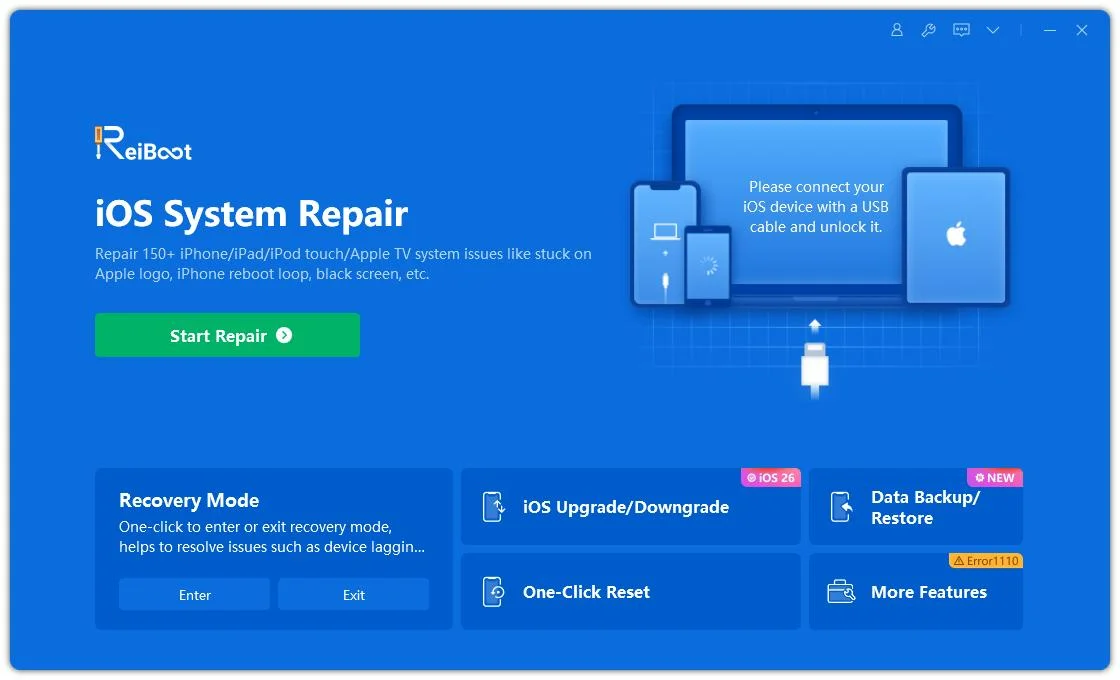
- Step 1: Launch ReiBoot
Download and install Tenorshare ReiBoot on your computer. Open the program and connect your iPhone that is stuck during the iOS 27 installation.
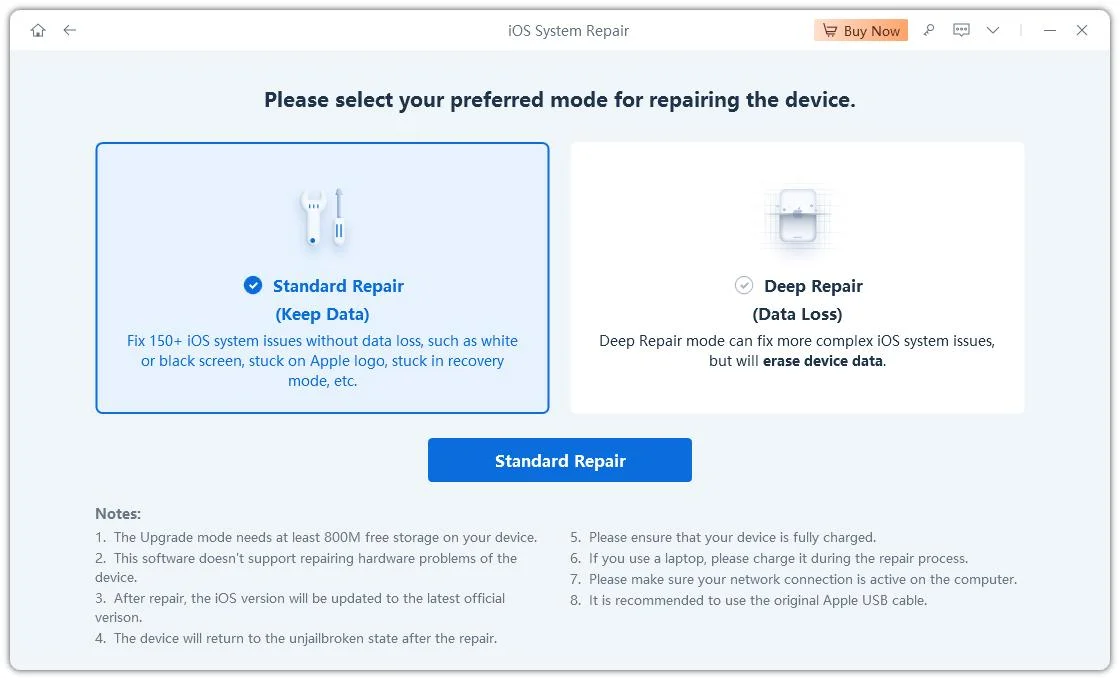
- Step 2: Click Standard Repair
Click on "Standard Repair" when ReiBoot detects your device to fix the iOS 27 stuck on install issue without deleting your data.
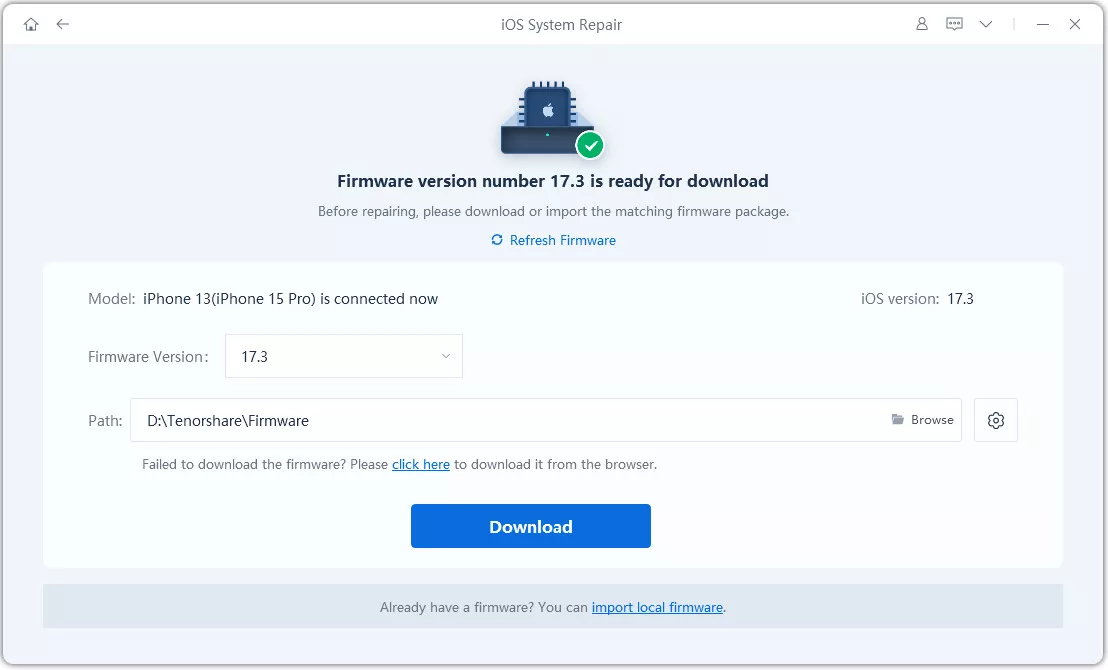
- Step 3: Download Firmware
Download the latest firmware package when prompted. ReiBoot will automatically prepare the suitable firmware for your device.
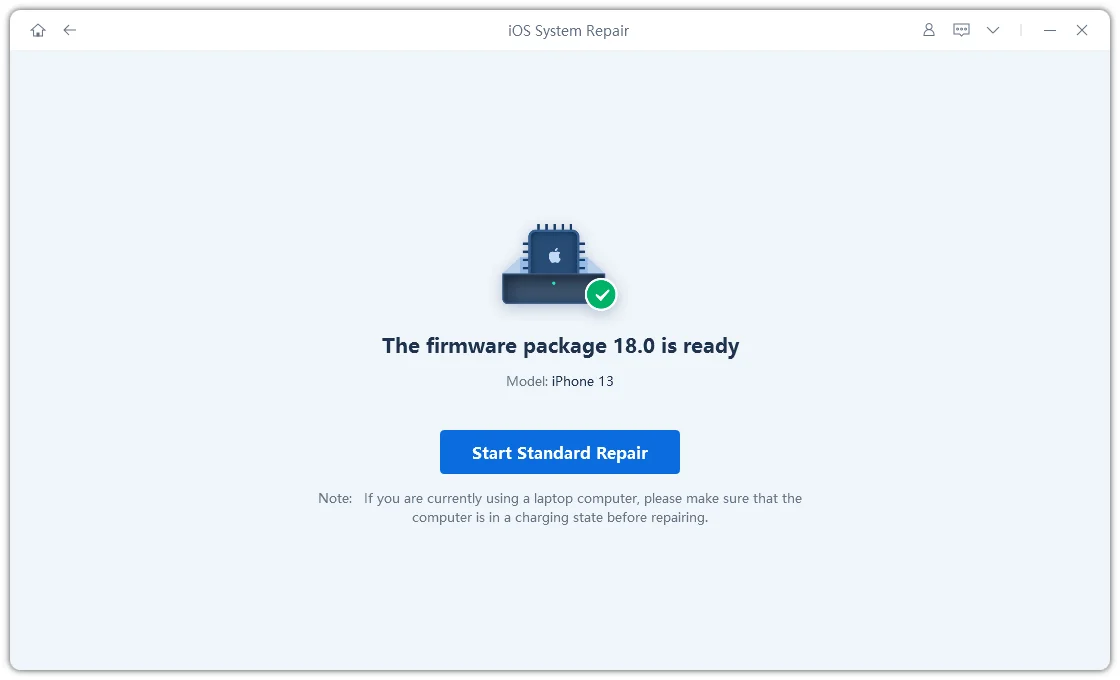
- Step 4: Start Standard Repair
Once the firmware is ready, click “Start Standard Repair” to fix the iOS 27 installation issue. Wait for the repair process to complete.
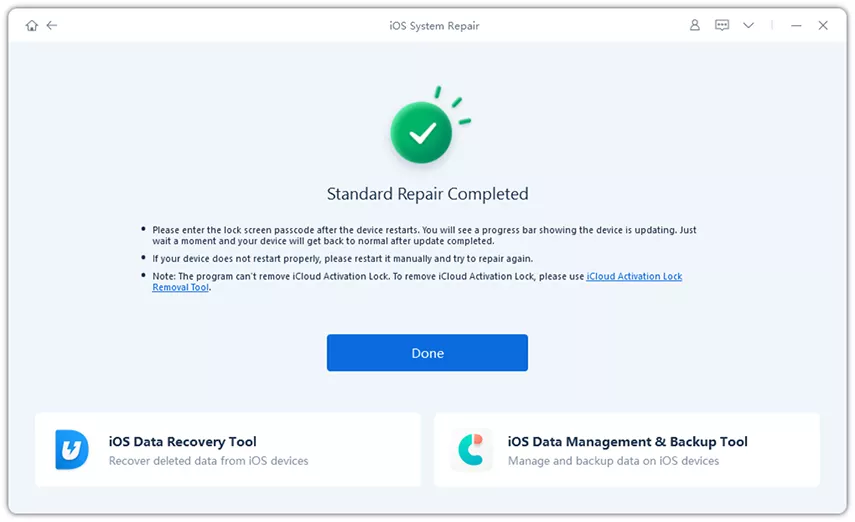
- Step 5: Fix iOS 27 Stuck on Install Successfully
Your iPhone will restart automatically after repair. Check if the iOS 27 installation finishes and your device works normally.
3. Force Restart Your iPhone
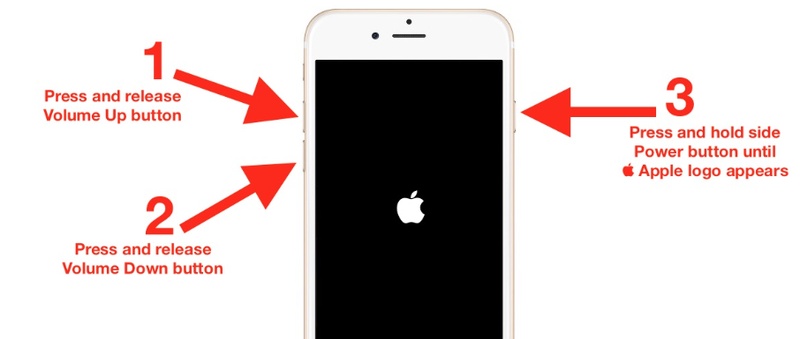
Use a force restart if your iPhone screen is frozen or the update spinner has been stuck for more than 30 minutes. It won't delete your data, will simply restart the device, and can help fix temporary software issues causing the update to freeze. Here's how to force restart your iPhone 8, X, 11, 12, 13, 14, 15, 16, or 17:
-
Step 1: Quickly press and release the "Volume Up" button. Then, do the same with the "Volume Down" button.
-
Step 2: Press and hold the "Side" (Power) button until you see the Apple logo. Next, release the "Side" button and let the iPhone boot normally.
Note: If your iPhone is mid-install (showing the progress bar), wait a full 30--45 minutes before force-restarting. Interrupting an active install can occasionally corrupt the update file, requiring a re-download.
4. Ensure Enough Battery
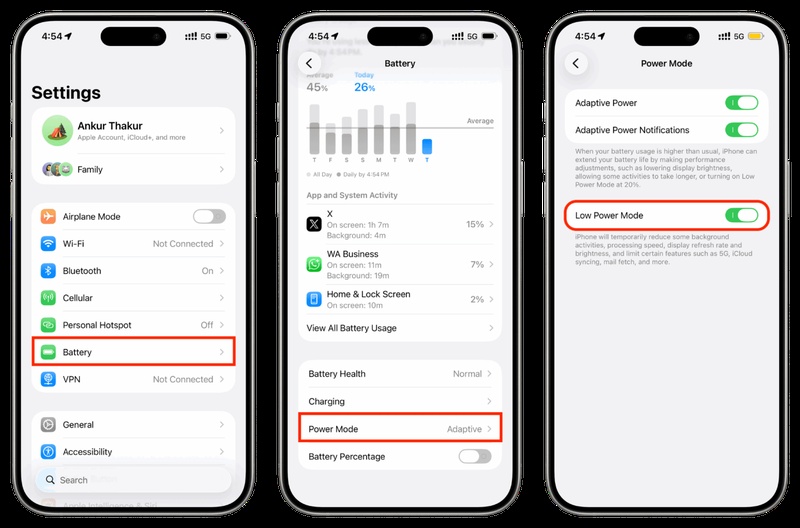
Your iPhone's software update might get stuck if its battery is below 50% or if Low Power Mode is on. Apple blocks updates when the battery is too low to prevent installation problems caused by the phone shutting down during the update. So, make certain your phone has sufficient battery:
-
Step 1: Plug your iPhone into a charger using an Apple or certified cable. Wait until the battery is above 50% before trying the update again.
-
Step 2: Keep your iPhone charging during the entire update process. Switch off Low Power Mode in "Settings" > "Battery" > "Power Mode" if it's enabled.
5. Free Up Storage Space
When your iPhone is low on storage, the iOS 27 update may get stuck during installation. The update needs extra free space to unpack and install properly. So, having less than 6--8 GB available can cause the process to fail or freeze on "Install Now." Here's how to free up your iPhone storage space:
-
Step 1: Head to "Settings." Then, choose "General." Tap "iPhone Storage" to check your available space.
-
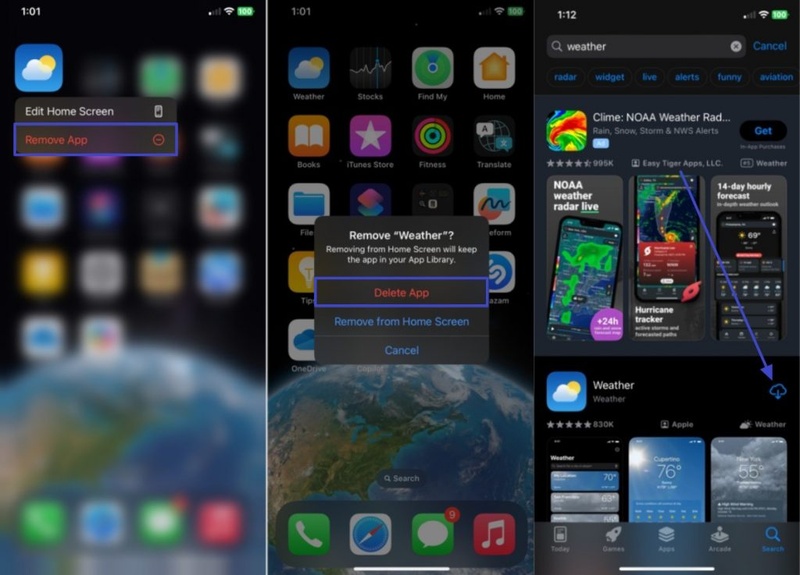
Step 2: Tap any app you no longer use, especially large games or streaming apps, and delete it.
-
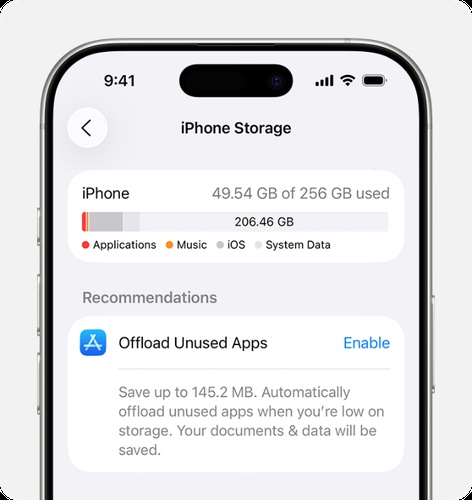
Step 3: Enable "Offload Unused Apps" in "iPhone Storage" to save space without deleting app data.
-
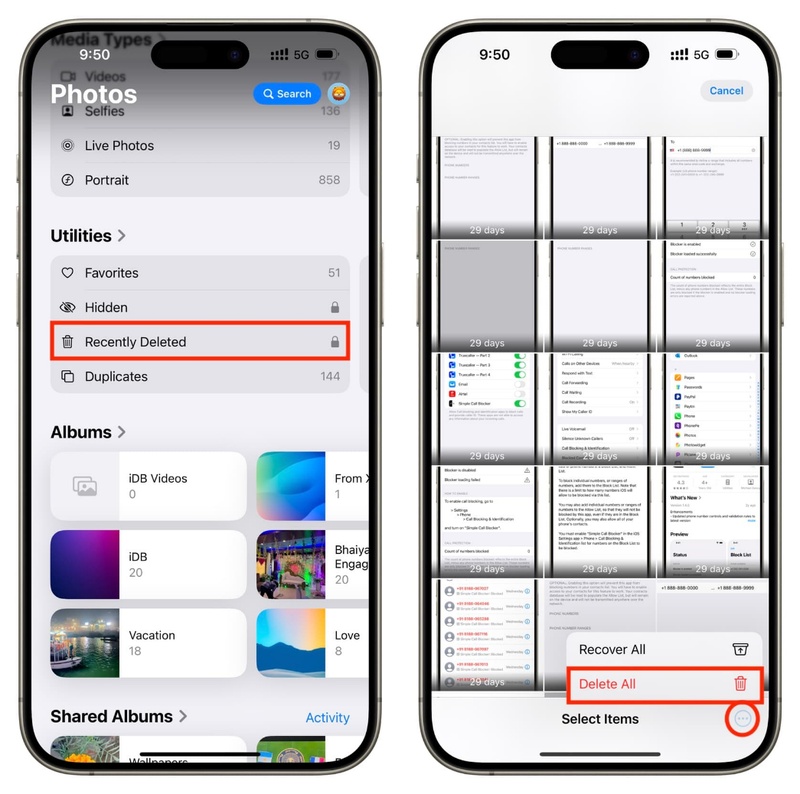
Step 4: Remove large videos or duplicate photos in "Photos," then empty the "Recently Deleted" folder.
-
Step 5: Try to keep at least 6 GB of free storage before updating again.
6. Delete the iOS Update File and Re-Download
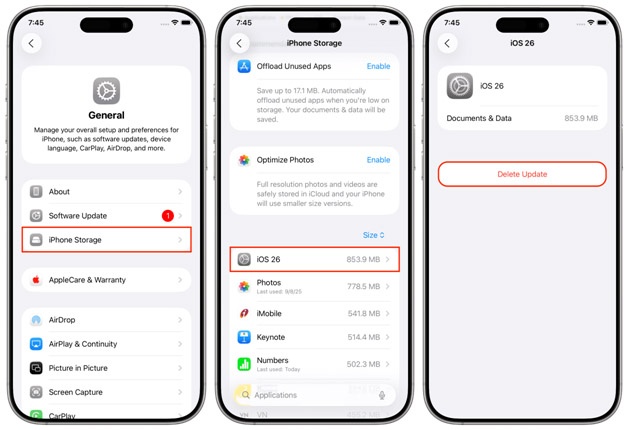
A damaged or incomplete iOS 27 file can also result in a "software update complete but stuck on the iPhone iOS 27" screen. So, deleting the update and downloading it again can often fix the issue. Here's how:
-
Step 1: Head to "Settings." Then, choose "General." Tap "iPhone Storage."
-
Step 2: Move down the list of apps until you find "iOS 27." Tap on it and select "Delete Update." Try downloading and installing the update again.
7. Reset Network Settings
Incorrect settings from a VPN, carrier update, or app can block the connection to Apple's servers and cause the iOS update to freeze during installation. But you can resolve this by resetting network settings:
-
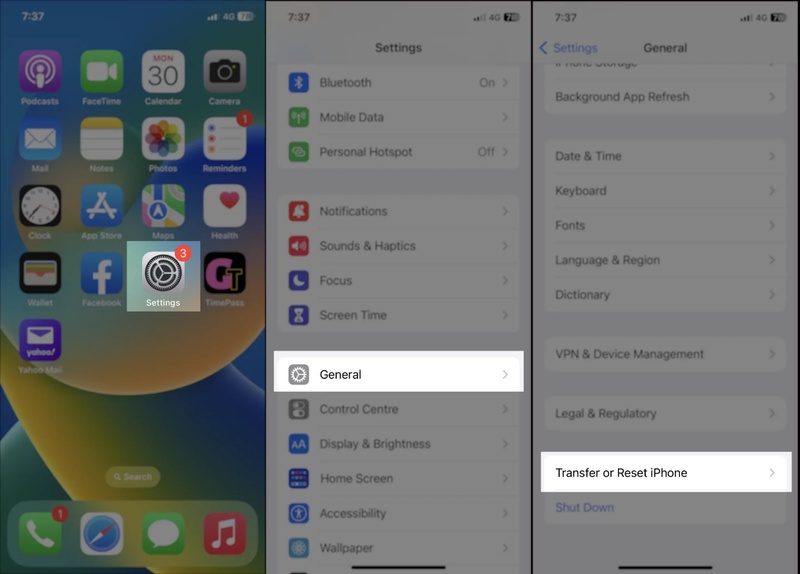
Step 1: Head to "Settings." Then, choose "General." Tap "Transfer or Reset iPhone." Click "Reset."
-
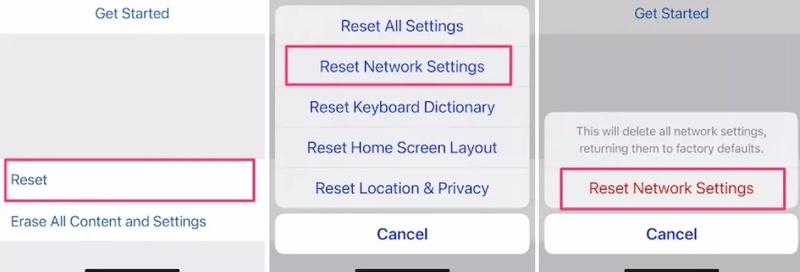
Step 2: Choose "Reset Network Settings." Enter your passcode when prompted and confirm the reset.
-
Step 3: Your iPhone will restart. Wi-Fi networks, Bluetooth pairings, and VPN configurations will be cleared (your personal data remains untouched).
-
Step 4: Reconnect to your Wi-Fi network and re-enter the password.
Note: If you use a VPN, make sure it's fully disconnected before attempting any installation. Some VPNs route traffic in ways that interfere with Apple's CDN for firmware delivery.
8. Update Using Finder or iTunes on a Computer
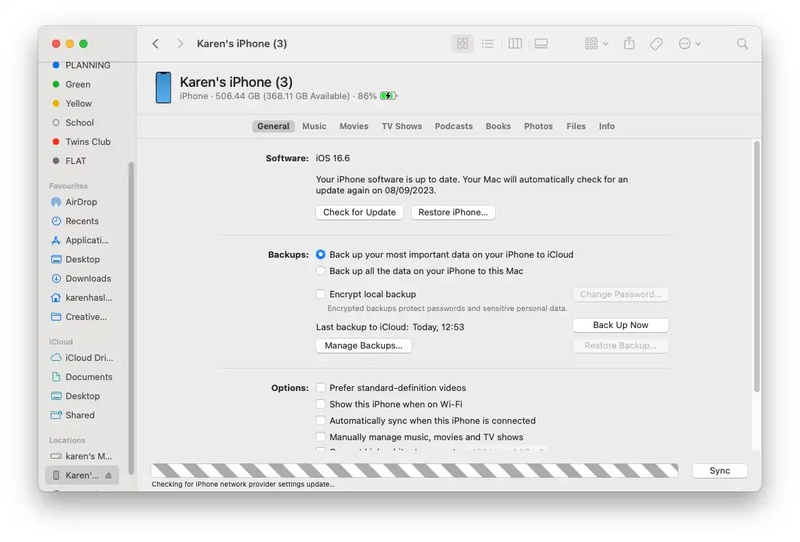
In case you're still facing the "iPhone 17 stuck on software update, with an 'Install Now' or 'Remind Me Later' message," update through Finder/iTunes. It will install the iOS 27 directly from your computer using a USB cable. This method avoids frequent problems with Wi-Fi, storage space, or corrupted update files on the iPhone. Here's how to update your iPhone to iOS 27 using Finder/iTunes:
-
Step 1: If you can, switch off your iPhone, and attach it to your Mac or Windows PC using a USB cable.
-
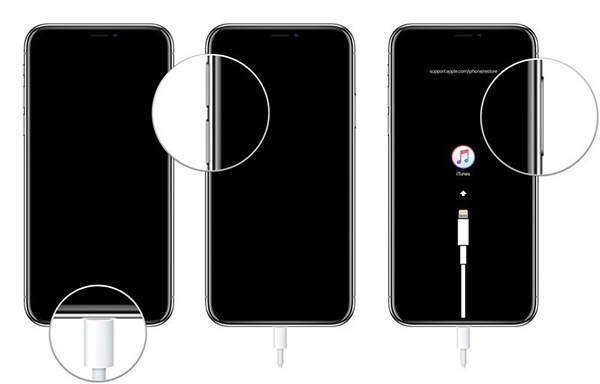
Step 2: Place it into Recovery Mode. To do that:
-
Quickly press and release the "Volume Up" button. Then, do the same with the "Volume Down" button.
-
Press and hold the "Side" button until you see the Recovery Mode screen appear.
-
-
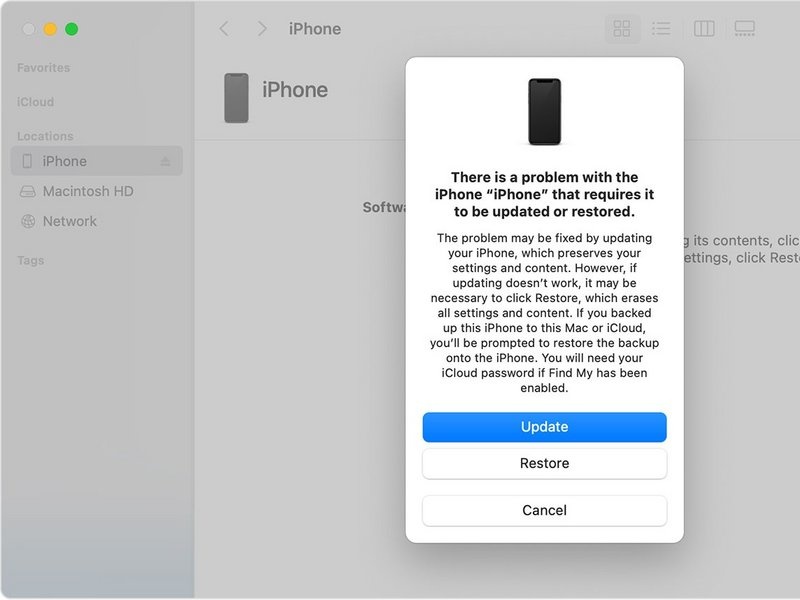
Step 3: Open "Finder" (Mac) or "iTunes" (Windows/older Mac). It will detect your iPhone in Recovery Mode and ask to "Update" or "Restore."
-
Step 4: Choose "Update" to install the latest iOS, like iOS 27, without deleting your data.
Note: Make a backup in Finder or iTunes first. While updating (not restoring) should preserve your data, it's always worth having a recent backup before any system-level operation
Part 3. Why iPhone Stuck on Software Update while Transferring Data
Are you wondering, "Why is my new iPhone stuck on software update while transferring data?" A specific, and particularly confusing, variant of this problem happens when you're transferring data to new iPhone, and it gets stuck on software update iOS 27, mid-transfer. Here's what's actually happening and why:
-
Different iOS Versions: "Quick Start" may fail if both iPhones aren't on the same or compatible iOS version. The update can get stuck during transfer.
-
Update + Transfer at Same Time: Transferring data and updating iOS together can overload the system and cause freezing or endless loading.
-
iOS 27 Profile Issue: If the iOS 27 profile isn't installed correctly, the update may fail without showing an error.
-
Apple Server Timeout: Sometimes Apple's servers are busy or slow, causing the update check to freeze during setup.
-
Low Storage Space: Not enough free space on the new iPhone can stop the update from installing properly.
-
Corrupted Update File: A damaged preloaded update file can block installation and needs to be deleted and downloaded again.
Conclusion
When iOS 27 gets stuck on the "Install Now" screen on your iPhone during the update, most of the time, it can be resolved with basic fixes. Other times it cannot if your iOS system has issues or the update file is corrupted. If that happens, try your hand at an iOS Repair tool, like Tenorshare ReiBoot. It can repair 150+ frequent iOS system issues without deleting your data or requiring technical skills, making it useful for fixing stuck updates and installation loops safely.
