
Updated on 2026-07-21 / iPhone Tips
iOS 27 brings exciting new features, but for many users, it also brought something nobody asked for. Bluetooth randomly disconnecting. Devices refusing to pair. Audio cutting out mid-call. If you are dealing with iOS 27 Bluetooth issues, you are far from alone.
This is a known problem hitting iPhone users worldwide right after updating. The fix exists and it does not require a factory reset or a trip to the Apple Store. This guide covers every working solution to get your Bluetooth running perfectly.
Part 1. Quick Comparison: Fixes for iOS 27 Bluetooth Issues
| Solutions | Success Rate | Data Loss | Ease of Use | Time Required |
|---|---|---|---|---|
| Turn Bluetooth Off & On | Medium | No | Very Easy | 1–2 minutes |
| Remove Bluetooth Interference | Medium | No | Easy | 3–5 minutes |
| ReiBoot System Repair | High | No | Very Easy | 10–15 minutes |
| Forget & Re-pair Device | High | No | Easy | 3–5 minutes |
| Move Closer to Device | Low–Medium | No | Easy | 1 minute |
| Restart iPhone & Bluetooth | Low–Medium | No | Easy | 3 minute |
| Reset Network Settings | High | No (Wi-Fi passwords removed) | Medium | 5–7 minutes |
| Update Accessory Firmware | Medium | No | Medium | 5–10 minutes |
| Charge Bluetooth Device | Medium | No | Easy | 10–30 minutes |
| Disable Airplane Mode | Medium | No | Very Easy | 1–2 minutes |
Part 2. Why Is Bluetooth Not Working After iOS 27 Update?
After updating to iOS 27, users may face Bluetooth issues like disconnections, lag, or unstable pairing. This usually happens because software is still in testing and may have bugs. As a result, Bluetooth connections can become slow or unreliable.
Common reasons include:
-
ios 27 bluetooth stuttering caused by unstable software
-
ios 27 bluetooth audio issues like lag or broken sound
-
Bugs in the iOS 27 system update
-
Corrupted or outdated Bluetooth pairing data
-
Temporary system glitches after updating
-
Compatibility issues with some Bluetooth accessories
Part 3. 10 Tips to Fix Bluetooth Issues After iOS 27 Update
iOS 27 Bluetooth issues usually don't fix themselves. Whether your iPhone 17 Bluetooth is dropping calls, AirPods audio is stuttering, or your car keeps disconnecting, there are clear fixes for each problem. Follow the steps below in order, starting from simple fixes to deeper solutions, to quickly find what works.
1. Turn Bluetooth Off and Back On
Simple as it sounds, this works way more often than it should and it's always your best first move. Sometimes an iOS Bluetooth glitch is just a temporary hiccup. Flipping the switch forces your iPhone to drop cached data and restarts the Bluetooth system completely fresh.
Open Settings on your iPhone.
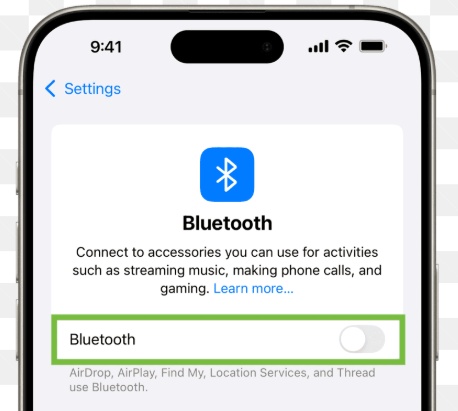
Tap Bluetooth at the top.
-
Switch Bluetooth OFF and wait until all devices fully disconnect.
-
Leave it off for about 30 seconds to let the system clear cached connections.
-
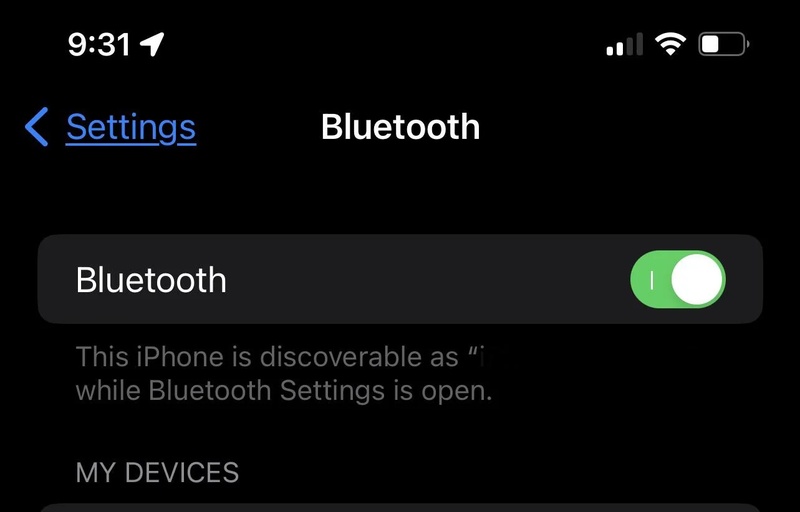
Turn Bluetooth ON again. Wait while your iPhone scans and shows available devices.
-
Tap your device (AirPods, car, speaker, etc.) to reconnect. Play audio or make a call to confirm the connection is stable and working properly.
2. Remove Bluetooth Interference From Nearby Devices
Bluetooth signals can be disturbed by multiple nearby devices, especially Wi-Fi routers, smart gadgets, or other active Bluetooth connections. This can lead to ios 27 bluetooth audio issues like lag or crackling. Reduces signal noise and improves connection strength.
Move away from crowded electronic areas.
Turn off unused Bluetooth devices nearby.
-
Disconnect extra paired devices from your iPhone.
-
Test your connection in a different room to avoid signal congestion.
3. Fix iOS 27 Bluetooth Issues Effortlessly with Reiboot
Repeated ios 27 bluetooth keeps disconnecting problems that do not respond to basic fixes often require a deeper system repair with ReiBoot. Unlike basic troubleshooting steps, ReiBoot digs deep into iOS system errors and repairs them without erasing a single byte of your data.
It fixes system-level glitches safely and helps restore stable Bluetooth performance. No technical skills are required just a few clicks to fix the 150+ ios issues with tenorshare reiboot.
Key Features of ReiBoot:
-
Repairs 150+ iOS issues including ios 27 bluetooth not working
-
Fixes system glitches, boot loops, frozen screens, and update errors
-
Repairs iPhone safely without data loss
-
One-click Recovery Mode entry and exit for free
-
Fully supports the latest iOS 27 versions
-
Helps upgrade or downgrade iOS safely
-
Works without iTunes and supports all iPhone models
How to Fix iOS 27 Bluetooth Issues Using ReiBoot:
- Step 1: Launch ReiBoot on Your Computer
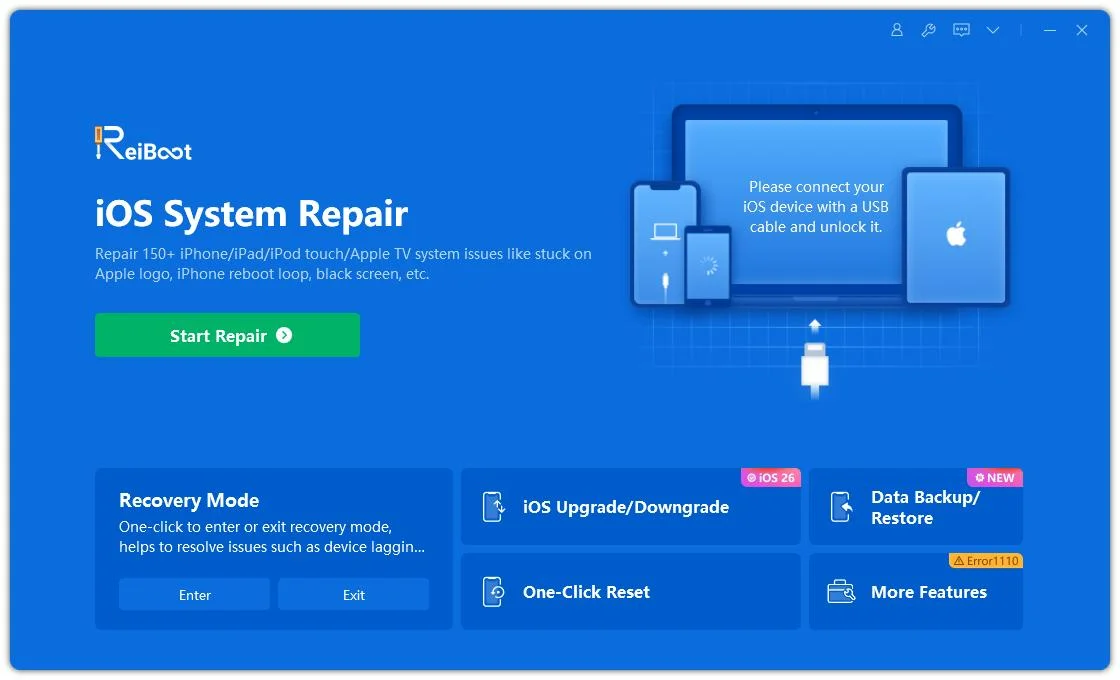
Download and install Tenorshare ReiBoot on your computer. Open the program and connect your iPhone experiencing Bluetooth issues after installing iOS 27.
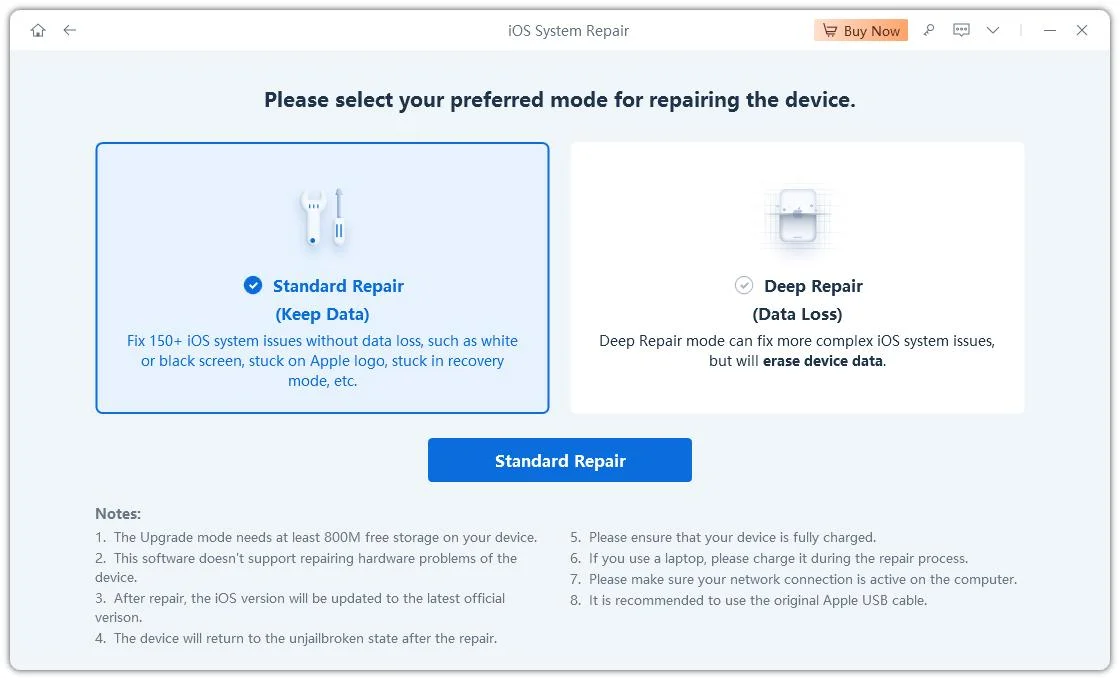
- Step 2: Click on "Standard Repair"
Click on "Standard Repair" when ReiBoot detects your device to fix iOS 27 Bluetooth problems without affecting your data.
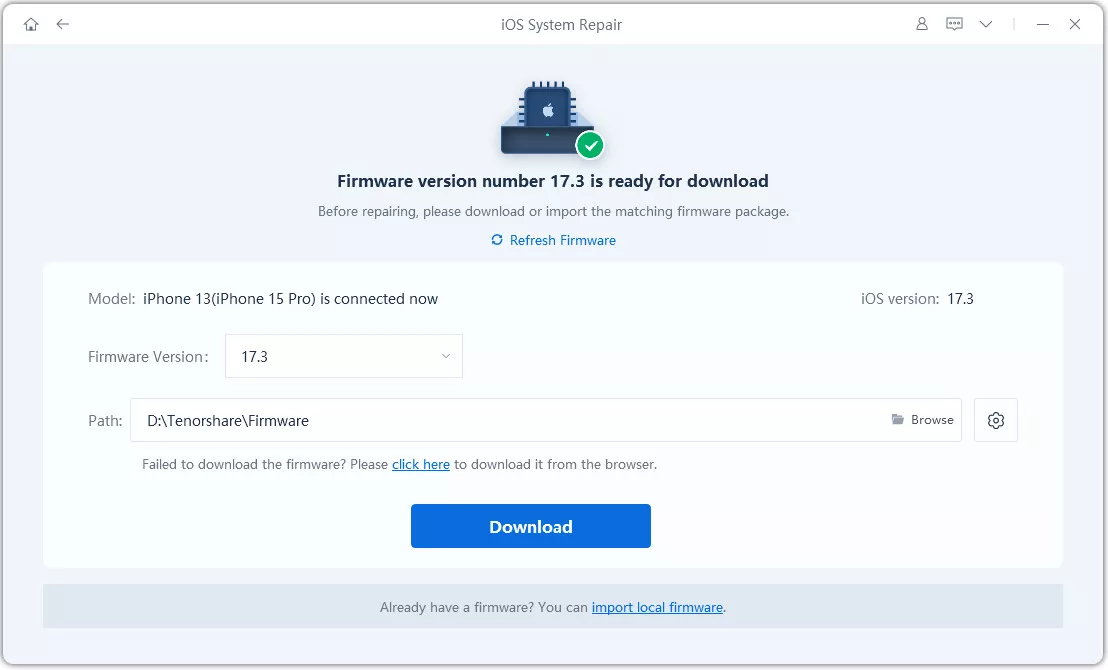
- Step 3: Download Firmware Package
Download the latest firmware package when prompted. ReiBoot will automatically prepare the correct system package for repair.
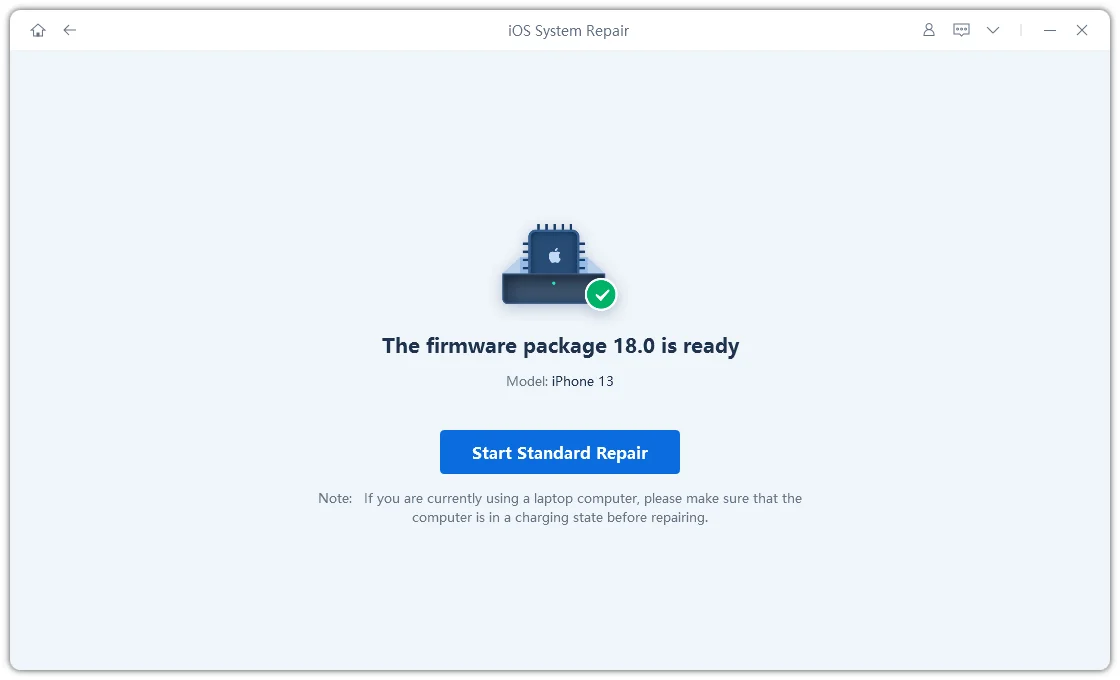
- Step 4: Start Standard Repair
Once the firmware is ready, click “Start Standard Repair” to begin fixing iOS 27 Bluetooth issues. Wait until the repair process finishes.
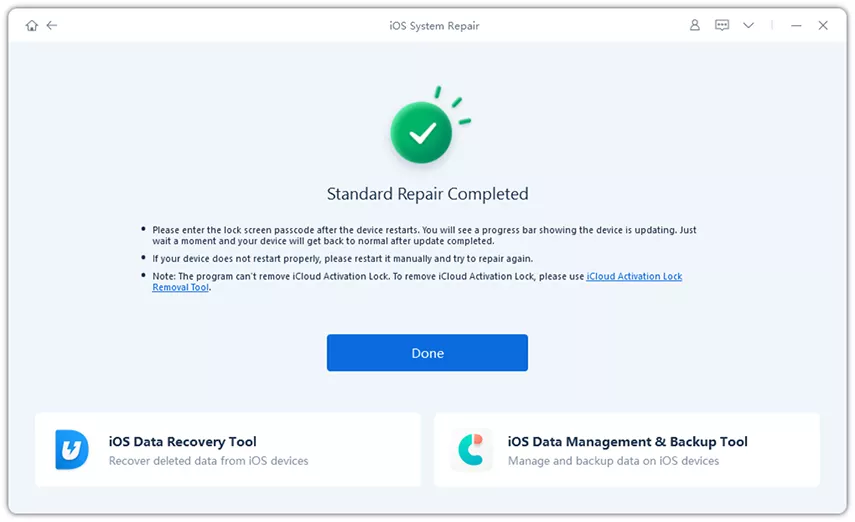
- Step 5: Bluetooth Works Again
Your iPhone will restart automatically. Check if Bluetooth can connect normally after the iOS 27 repair is completed.
4. Forget the Bluetooth and Pair Again
Corrupted pairing data is one of the most common reasons behind iphone bluetooth keeps disconnecting on ios 27. After a update, your iPhone may still try to use old connection settings that no longer work properly. Removing the saved Bluetooth connection forces your iPhone to create a completely fresh pairing, which often fixes random disconnects, failed connections, and unstable audio.
Steps:
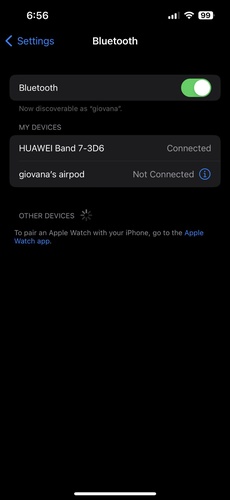
Open Settings and tap Bluetooth.
-
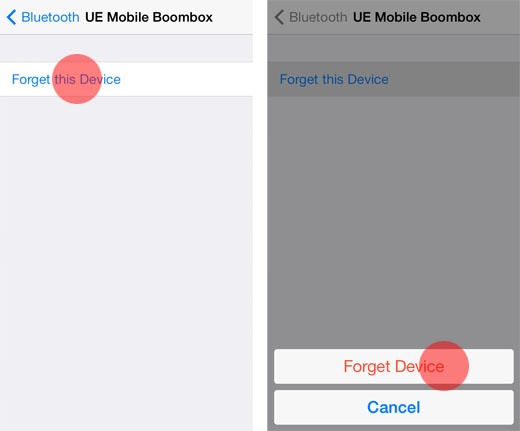
Find the device causing problems and tap the (i) icon beside it.
-
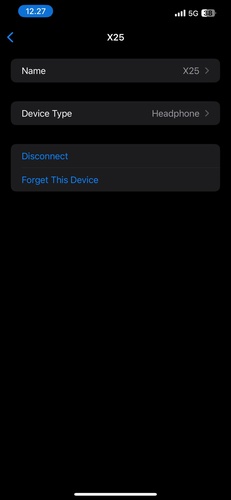
Select Forget This Device and confirm the action.
-
Turn Bluetooth OFF and wait a few seconds before enabling it again.
-
Put your Bluetooth accessory into pairing mode. Reconnect the device once it appears on the screen.
5. Move Closer to the Bluetooth
Distance and physical barriers can weaken Bluetooth signals and cause ios 27 bluetooth problem like lag, audio cuts, or disconnections. Keeping devices closer helps improve connection stability. Remove obstacles like walls, metal objects, or furniture between the devices
Avoid placing your iPhone inside pockets or bags during use. Reconnect the device and test whether the Bluetooth performance improves.
6. Restart Your iPhone & Bluetooth
Temporary glitches in iOS 27 can interrupt Bluetooth connections and cause problems like iphone bluetooth keeps disconnecting on ios 27. Restarting your iPhone and Bluetooth device refreshes the system, clears stuck background processes, and reloads Bluetooth services properly.
Steps:
Open Settings > Bluetooth and turn Bluetooth off.
Wait about 10 seconds before turning it back on.
-
If the issue continues, restart your iPhone completely.
-
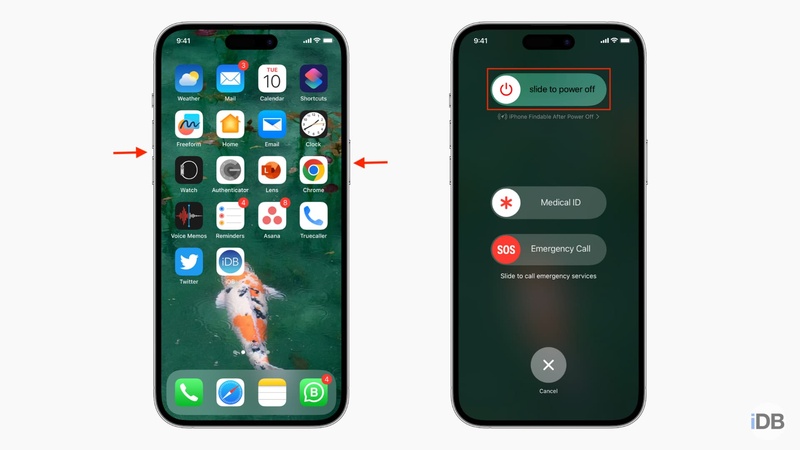
Press and hold the Side button + Volume button until the power slider appears. Drag the slider to turn off your iPhone and wait 30 seconds.
-
For iphone keep disconnecting from bluetooth in car, restart your car system as well before reconnecting
7. Reset Network Settings to Fix Bluetooth Bugs
Damaged network settings can cause repeated ios 27 bluetooth problem and unstable connections. Resetting network settings removes corrupted Bluetooth and Wi-Fi data, giving your iPhone a fresh connection setup.
Steps:
Open Settings and go to General.
Tap Transfer or Reset iPhone.
-
Select Reset > Reset Network Settings.
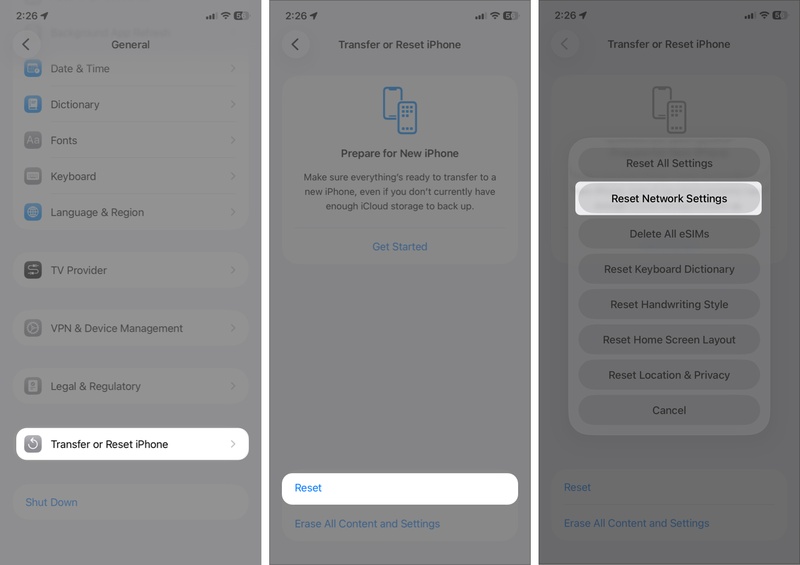
Enter your passcode to confirm the reset.
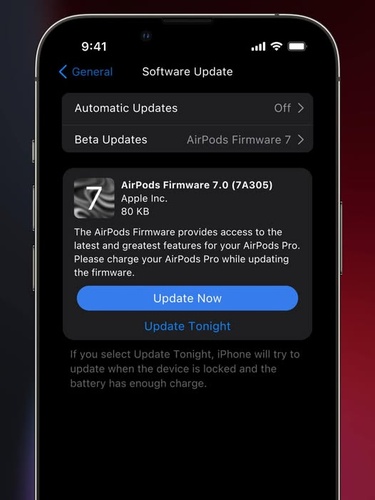
8. Update AirPods or Bluetooth Accessory Firmware
Old firmware on AirPods or other Bluetooth devices can cause ios 27 bluetooth not working issues. Even with the latest iOS 27 installed, outdated accessory software may not work properly with the new Bluetooth system. Updating the firmware improves compatibility and helps fix many Bluetooth connection problems.
9. Charge Your Bluetooth
Low battery is a common reason behind iphone bluetooth keeps disconnecting on ios 27. When your Bluetooth device has very little power, it may struggle to keep a stable connection, causing random disconnects or pairing problems. This can happen more often on iOS 27 because software may use more power during Bluetooth communication.
10. Disable Airplane Mode
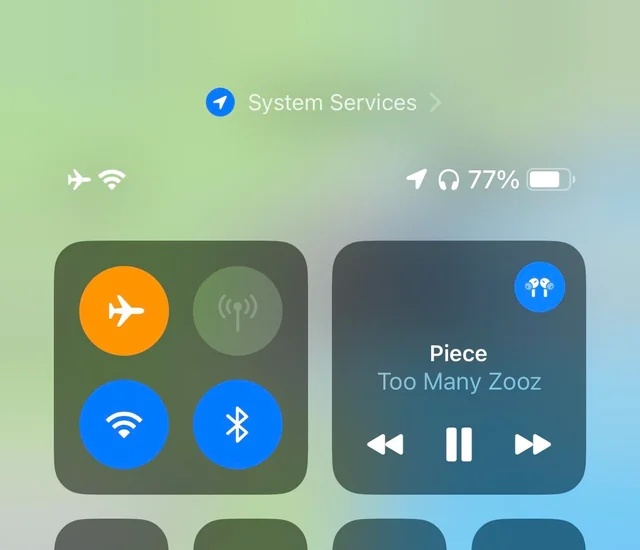
Airplane Mode can interrupt wireless services and sometimes prevents Bluetooth from reconnecting correctly after the iOS 27 update. Turning it off properly helps refresh Bluetooth connections.
Steps:
Open Control Center on your iPhone.
Check if the Airplane Mode icon is enabled.
Turn Airplane Mode OFF if it is active.
Conclusion:
Fixing iOS 27 Bluetooth issues doesn't have to be a nightmare the right steps make all the difference. Try the basic fixes first and gradually work through the list. For persistent iOS 27 Bluetooth problems that refuse to budge, ReiBoot remains the ultimate tool. It repairs hidden iOS issues safely, restores stable connections, and helps your iPhone work smoothly again without data loss.
